



Jira Automation Is Now Billed by Steps: What It Means for Your Budget

From December 2026, Atlassian charges for Jira automation by the step, not by the rule run. For many teams, this sounds like a sudden rise in costs. It isn’t.
For most organizations, the change will not bring large bills next month. Each plan includes a monthly allowance of steps, and usage above it is priced at $0.50 per 1,000 steps. What changes is predictability: automation becomes a cost that depends on how your rules are built.
That can be planned for. In this article, we explain how steps are counted, which industries and processes use the most of them, how to check your current usage and what to change in your rules to keep costs under control.
What Changes in Atlassian Cloud Pricing for Automation
Until now, usage was measured in rule runs. One run counted as one unit, no matter how much work the rule did. Now Atlassian counts automation steps. A step is each part of a rule that runs: a trigger, a condition, an action, a branch or a loop. A rule that used to count as one run may now count as five, ten or more steps.
What is not charged
- Runs where the rule stops before any action is performed.
- System steps, such as writing to the log or creating a variable.
- Runs stopped by Atlassian because of throttling or a system error on their side.
- Rovo AI actions inside rules. These are billed separately as Rovo credits
Who is affected most
The change matters most for organizations that rely on automation in high-volume, regulated processes. Banks are a clear example.
Banks don’t need to cut back on automation. They need control and planning.
- Strict SLAs. A client reports a failed payment, and the bank must respond within four hours. Automation reminds the agent after two hours, alerts the team lead before the deadline and escalates the ticket if it is breached. These rules act on many open tickets every day.
- Multi-level approvals. Changes to systems, access and payments often need several approvals. Each approval step is usually backed by automation.
- Compliance and audit trails. Rules that log decisions, notify control owners and update records add steps to every request.
- Fixed budgets. Banks plan IT spending a year ahead and approve it through procurement. A variable monthly cost is harder to plan and to justify.
- Limited room to switch rules off. Turning off extra usage stops all rules at the limit, including SLA and compliance rules. For a bank, that is rarely an acceptable option.
Telecom operators and public sector organizations face similar pressure: high request volumes, strict deadlines and long approval chains.
Jira Cloud Pricing: Shared Limits and Overage Costs
How many automation steps do you get? It depends on your Atlassian plan and the number of users.
Each plan includes a monthly allowance of automation steps. On paid plans, the allowance is calculated per user. On Free, it is set per subscription. Allowances refresh every month.
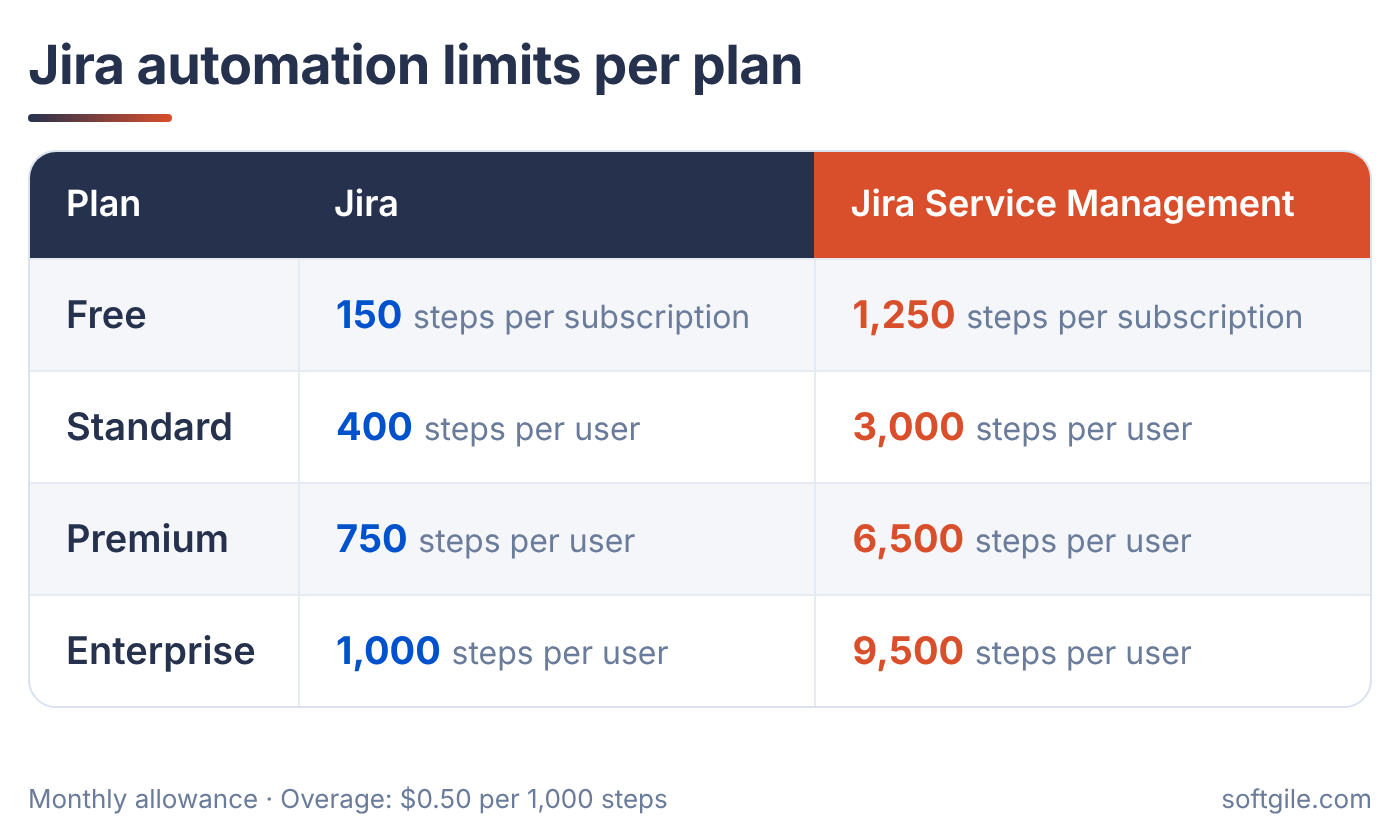
Limits for Confluence, Jira Product Discovery and Teamwork Collection are listed in Atlassian’s documentation.
What happens above the limit
Usage above the allowance costs $0.50 per 1,000 extra steps. It is added to your next invoice. Admins receive notifications at 80% and 100% of the limit.
If extra usage is turned off, automation rules stop running once the limit is reached. They start again when the allowance resets.
How to Check and Monitor Jira Automation Usage
Atlassian shows automation usage at two levels: for the whole organization and for each rule.
Organization-wide usage. In Atlassian Administration, go to Usage → Meters → Automation steps. Here you see how much of the shared monthly pool is already used and how much is left.
Usage by rule. In Jira, go to Settings → System → Global automation → Usage. This list shows which rules use the most steps. Open a rule’s audit log to see how many steps each run consumed.
A Practical Example: Automation Costs in a Bank
Here is how a bank with 200 service desk agents can keep automation costs predictable.
- Act on the early warning. Atlassian notifies admins when 80% of the monthly allowance is used. Say this happens on the 20th of the month. The admin opens the usage list, sees that one new escalation rule uses a third of all steps and fixes it before the limit is reached.
- Set a monthly spending cap. The bank agrees on a fixed amount for extra usage, for example $300 a month, and sets it as a limit. If usage grows, costs stop at that amount. Finance gets a predictable number for the annual budget.
- Keep critical rules running. The bank does not turn off extra usage completely. If it did, all rules would stop at the limit, including SLA escalations for failed payments. With a cap instead, critical rules keep working and costs stay controlled.
- Check the top rules every week. A 15-minute weekly review of the five rules that use the most steps is enough. It helps catch a broken or duplicated rule early, for example a rule that sends the same reminder twice.
What Generates the Most Automation Steps
Some rules use your shared pool much faster than others. A rule only uses steps when it performs an action. Rules that check a condition and stop without doing anything are not charged. Usage grows when rules run often and do a lot of work each time.
The biggest consumers are usually:
- Rules triggered on every issue update. A single field change can start several rules at once. Each rule that performs an action uses steps.
- SLA rules. Escalations and reminders before or after an SLA breach run on many tickets every day.
- Queue management. Rules that assign, re-route or re-prioritise requests run each time a ticket moves.
- Automatic notifications. Messages to customers and agents on each status change add steps for every request.
- Loops and branches. A rule that updates each subtask or linked issue counts steps for every item it processes.
- Scheduled rules. Daily or hourly checks can act on hundreds of issues at a time.
- Duplicate rules. Several rules doing similar work multiply the count.
In Jira Service Management, these factors add up quickly. A single request can trigger several rules from creation to closure, so high ticket volume means high step usage.
Typical patterns by team
Which rules use the most steps depends on your processes. These patterns are common:
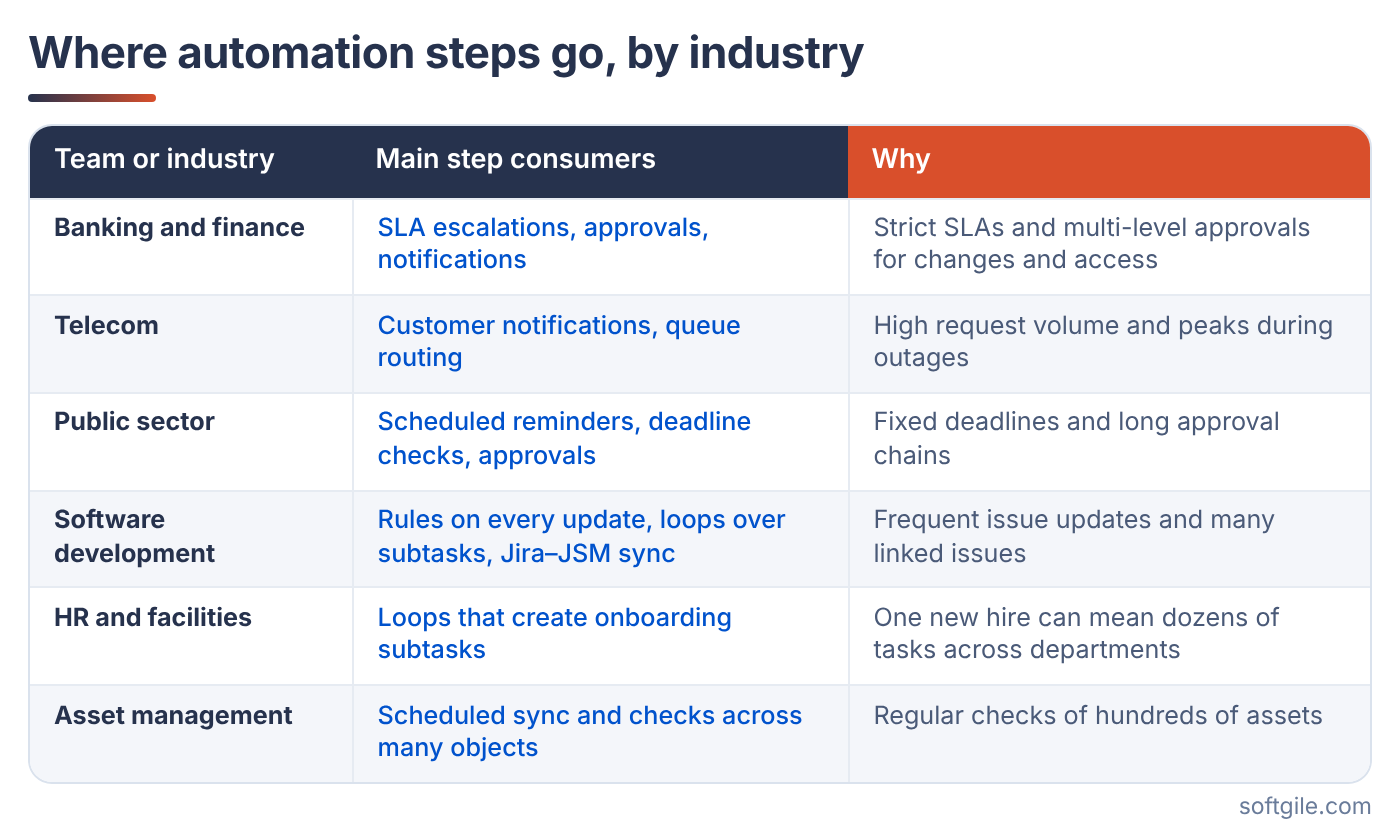
Knowing where your usage comes from is the first step to keeping it under control. Knowing where your usage comes from is the first step. The next section shows how to reduce it.
How to Optimize Jira Automation Rules and Reduce Costs
Most step usage can be reduced without lowering the level of service. The principles are simple:
- Run rules only for the requests that need them.
- Combine similar rules and checks instead of keeping many small ones.
- React to events instead of scanning all tickets on a schedule.
- Use built-in service desk features where they can replace custom rules.
- Turn off rules nobody needs anymore.
Applying them is less simple. Every change has to keep SLAs, approvals and audit trails working exactly as before. In a bank, one wrong change to an escalation rule can mean a missed deadline on a client’s payment.
This is where an expert review helps. Softgile’s Atlassian consultants audit your automation rules, show which ones use the most steps and redesign them to keep costs predictable without breaking critical processes.
Let’s structure your operations
Tell us about your current challenges and we’ll show where structure creates measurable business impact.